
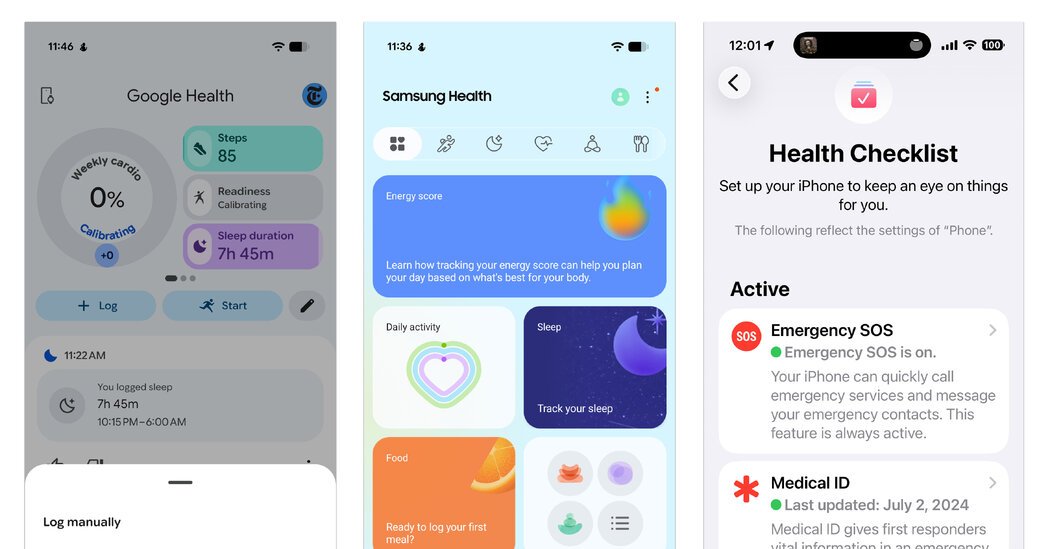
The health app on your phone’s home screen has many uses, even if you don’t have a smartwatch or fitness tracker. With a little manual effort, you can use the app to get a better idea of your general wellness.
For example, you can keep a food-and-fitness diary there. Most phones provide a free basic step-counting function. And you can link other exercise and diet apps you use to streamline your data.
Many medical providers let you import records from your doctor, and you can create a “medical ID” for your phone’s lock screen in case of emergency.
Here’s how to get started.
Choose Your App
Although third-party options abound, the basic health apps from Google, Samsung and Apple have been available for years and have been steadily adding new features:
The menus in the health apps can be a little overwhelming, so take time to explore. Each app offers a place to manually log your daily workouts, food intake, emotional state and sleep time.
You can set up medication reminders. And if you use a compatible separate exercise or diet app, you can often link it to the health app so you don’t have to log updates twice.
Many phones have an automatic step-counting feature already enabled. While not as precise as some dedicated sensors, the step count shown on the main screens of Google Health, Samsung Health and Apple’s Health can give you a general idea of your daily distance. (If your phone isn’t counting your steps, check your settings to make sure the fitness-tracking feature is turned on.)
Sync Health Records
Many health care providers use “patient portal” sites like MyChart that allow you to log in and see your test results and other electronic medical records. If the provider’s site is compatible with your health app, you can synchronize those records to have them all in one place. You’ll need the login credentials you use for the provider’s online patient portal.
If you have confidentiality concerns about pulling in digital records to a different app, check your health app’s privacy policy before you proceed. Google Health, Samsung Health and Apple’s Health all have explanations on their sites. Note that federal privacy laws generally don’t apply to mobile devices.
The Google Health support site has a page of detailed instructions. To sync your records directly from your health care provider, open the Google Health app, tap the Connections icon in the upper-left corner of the screen and tap Medical Records; iOS users must tap Apps and Services first to get to the Medical Records option. On the Medical Records screen, select Manage Connections and then the Add More Providers button to search and sync your files.
In Samsung Health, open the app, tap the Home tab at the bottom of the screen, scroll down and tap to Health Records to get started.
In Apple’s Health app, from the Summary screen, tap your profile icon in the upper-right corner. On the next screen, tap Health Records and follow the onscreen prompts so you can view your files, test results and other data from your doctor, or share information.
Create a Medical ID
Even if you don’t plan to use it as a personal-health database, your phone can show important information to emergency medical workers on your phone’s lockscreen, should you be incapacitated. These details can include blood type, any current prescriptions or health conditions you have, and your organ-donor status.
On many Android models, open (or download and open) the Personal Safety app, and tap the Your Info tab at the bottom of the screen. There, you can add your medical information and an emergency contact person.
On a Samsung Galaxy phone, tap the Settings icon, select Safety and Emergency, and then tap the options for adding medical and emergency contact information.
On an iPhone, open the Health app. If you aren’t prompted to set up your Medical ID, tap your profile photo in the top-right corner and choose Medical ID. On the next screen, add or edit the details you wish to share, and give permission to have the information displayed when your phone is locked.
Setting up a smartphone medical ID is worth your time: A recent study led by the University of Rochester showed the information was useful for patient care in 75 percent of cases.

